Tool calling is the mechanism that turns a language model from a text generator into an agent: instead of only answering in prose, the model can request that your code run something — a lookup, a query, a click — and use the result to keep working. Everything below is organized around that one mechanism and the practical tools built on top of it, based on the current official documentation for each vendor.
Table of Contents
- SDK Tool Calling
- Vercel AI Gateway
- DataForSEO
- Web Search
- Database Tools
- Browser Automation
- API Integrations
- File & Document Processing
- Monitoring & Logging
- Tool Orchestration
- Security & Permissions
- End-to-End Agent Workflow
1. SDK Tool Calling
Tool use (also called function calling) lets Claude call functions that you define, or that Anthropic provides and runs itself. Claude never executes anything — it returns a structured request, your code runs it, and you send the result back so Claude can continue.
Defining a tool
A custom tool is a JSON Schema wrapped in three fields: name, a plain-language description Claude uses to decide when to call it, and an input_schema that constrains the arguments.
{
"name": "get_weather",
"description": "Get the current weather for a given location.",
"input_schema": {
"type": "object",
"properties": {
"location": {
"type": "string",
"description": "City and state, e.g. San Francisco, CA"
}
},
"required": ["location"]
}
}Add strict: true to a custom tool definition to guarantee the returned arguments always conform to that schema exactly, instead of relying on the model to get it right.
The round trip
user message
-> model returns a `tool_use` block (id, name, input)
-> your code executes the call
-> you send back a `tool_result` (matched by tool_use_id, not order)
-> model answers using the resultThe response stops with stop_reason: "tool_use" and one or more tool_use content blocks. Your application executes the call and appends a tool_result block, either with the output or is_error: true and a message the model can react to.
const tools = [
{
name: "get_weather",
description: "Get the current weather for a given location.",
input_schema: {
type: "object",
properties: { location: { type: "string" } },
required: ["location"],
},
},
];
const response = await client.messages.create({
model: "claude-opus-5",
max_tokens: 1024,
tools,
tool_choice: { type: "auto", disable_parallel_tool_use: true },
messages: [{ role: "user", content: "What's the weather in San Francisco?" }],
});
const toolUse = response.content.find((b) => b.type === "tool_use")!;
const weather = await getWeather(toolUse.input.location); // your handler
const followup = await client.messages.create({
model: "claude-opus-5",
max_tokens: 1024,
tools,
messages: [
{ role: "user", content: "What's the weather in San Francisco?" },
{ role: "assistant", content: response.content },
{
role: "user",
content: [
{ type: "tool_result", tool_use_id: toolUse.id, content: weather },
],
},
],
});Internal workflow: how a tool call actually happens
The round trip above is the wire format. Underneath it, two things are happening at once: the model's reasoning about whether it needs a tool at all, and the plumbing that carries that decision from the user's message down to a real API and back. It's worth tracing both separately.
1 — the model's reasoning trace. Nothing here is magic: the model decides it lacks the fact it needs, names a tool that could supply it, and pauses generation to ask for that tool instead of guessing — for "What's the weather in Dhaka?" that means reasoning that it has no real-time weather access, emitting tool_call { name: get_weather, args: {city: "Dhaka"} }, waiting on your backend's get_weather("Dhaka") call, and only then writing "It's 33°C and partly cloudy in Dhaka."
Notice the model makes two separate generations — one that ends early in a tool_call instead of an answer, and a second one, after it sees the result, that produces the actual reply. Nothing is answered "in one shot" once a tool is involved.
2 — the full request path. In a real app, that two-generation exchange is sandwiched between a frontend, a backend, and whatever SDK you're using to talk to the model — each with a narrow, specific job.
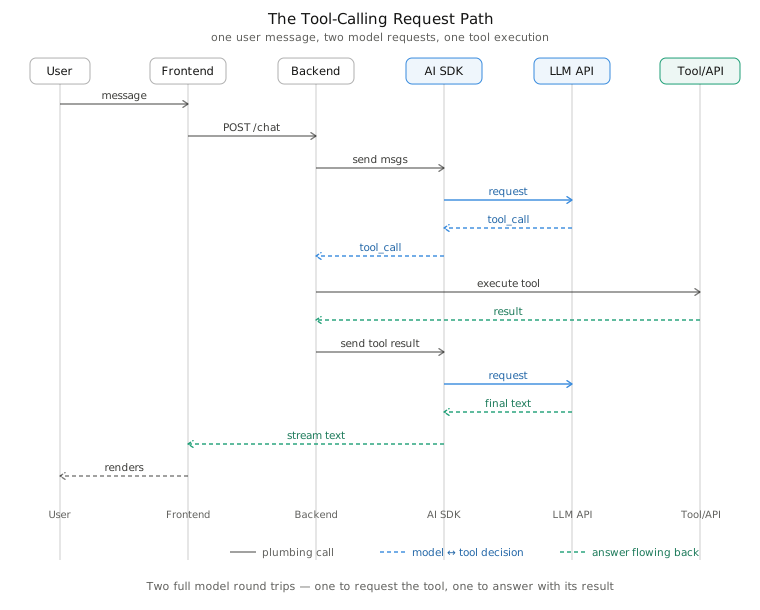
| Actor | Job |
|---|---|
| User | Sends a plain natural-language message — has no notion that a tool exists |
| Frontend | Forwards the message to your backend and streams the eventual answer back into the UI |
| Backend | Owns the loop: calls the model, notices a tool_call, executes the matching handler, and feeds the result back for a second model call |
| AI SDK | Marshals messages into the provider's wire format and parses tool_call / tool_result blocks out of the response, so the backend works with typed objects instead of raw JSON |
| LLM API | The model provider endpoint itself (Claude, or whatever AI Gateway routes to) — reasons about the message and either answers directly or emits a tool call |
| Tool/API | The real system a tool wraps — a weather service, a database, DataForSEO (§3) — has no awareness of the model; it just answers a normal function call |
The two diagrams describe the same event at different zoom levels: the first is what happens inside the model's turn, the second is what happens around that turn in your stack. Every tool call in this note — DataForSEO in §3, a database read in §5, a wrapped REST API in §7 — is this same shape with a different box swapped in for "Tool/API."
Client tools vs. server tools
| Kind | Runs where | Examples |
|---|---|---|
| Client tools | Your application | Anything you define, plus Anthropic-schema tools like bash, text_editor |
| Server tools | Anthropic's infrastructure | web_search, web_fetch, code_execution, tool_search |
Controlling when tools fire
tool_choice steers the decision: auto (default — model decides), any (must call some tool), a named tool (must call that one — a clean way to force structured output), or none. disable_parallel_tool_use: true caps a turn at one call; leave it off and the model may request several tools in the same turn to fan out independent lookups (see §10).
Tool schemas and results are billed tokens, not free metadata — every tool declared in tools adds to the request's input tokens, and a request with any tools attaches a small fixed system-prompt overhead (roughly 300–500 tokens on current Claude models, more for tool_choice: any/tool). Past a handful of tools, the tool_search server tool loads definitions on demand instead of putting every schema in context up front, and the Agent SDKs ship a Tool Runner that drives the whole dispatch loop for you.
Streaming tool calls
With stream: true, a tool_use block doesn't arrive whole — it's assembled from a sequence of server-sent events, the same way text arrives token by token:
message_start
content_block_start { type: "tool_use", id, name, input: {} }
content_block_delta { type: "input_json_delta", partial_json: "{\"loc" }
content_block_delta { type: "input_json_delta", partial_json: "ation\":\"SF\"}" }
content_block_stop
message_delta { stop_reason: "tool_use" }
message_stopEach input_json_delta carries a fragment of the arguments' JSON text, not a parseable object on its own — accumulate partial_json per content-block index and only JSON.parse the concatenated string once content_block_stop fires for that block:
const chunks: Record<number, string> = {};
for await (const event of stream) {
if (
event.type === "content_block_start" &&
event.content_block.type === "tool_use"
) {
chunks[event.index] = "";
}
if (
event.type === "content_block_delta" &&
event.delta.type === "input_json_delta"
) {
chunks[event.index] += event.delta.partial_json;
}
if (
event.type === "content_block_stop" &&
chunks[event.index] !== undefined
) {
const input = JSON.parse(chunks[event.index]); // safe only now — the fragment is complete
await dispatch(toolNameForIndex[event.index], input);
}
}Dispatching on a mid-stream fragment throws or silently misparses — the args aren't valid JSON until the block closes. The Anthropic SDK's client.messages.stream() helper wraps this accumulation for you and exposes a completed block instead of raw deltas, but the underlying wire format is the same whether you read it manually or through the helper.
Extended thinking + tool use
When extended thinking is on, the model's reasoning can appear as a thinking content block before a tool_use block in the same turn — the model reasons about which tool to call, then calls it. That thinking block carries a signature field the API uses to verify it wasn't tampered with; when you send the conversation back after a tool_result (continuing the turn), the prior thinking block must be replayed unmodified, signature included, not edited or dropped — the API rejects a continuation whose reasoning trace doesn't match what it originally produced.
A redacted_thinking block can appear in place of a plain one when content is flagged internally; treat it the same way — pass it back as-is, don't attempt to read or alter it.
With the interleaved-thinking capability enabled, the model can think again between tool calls within one turn — not just once before the first — useful when a second tool call's arguments genuinely depend on reasoning about the first tool's result rather than just the raw value. Without interleaving, thinking is front-loaded before the first tool_use and the turns after each tool_result skip straight back to acting.
What exactly is an SDK
An AI SDK (Software Development Kit) is a library that wraps the raw HTTP API of an LLM provider (or several providers) into ergonomic, typed, language-native functions — handling the repetitive plumbing so you can focus on your application logic.
Why SDKs exist — the problem they solve. If you called the raw REST API yourself, you'd have to hand-write, for every single request:
- HTTP headers and authentication
- JSON request body construction
- Streaming (Server-Sent Events) parsing, token by token
- Retry logic for rate limits (
429) and transient errors - Type validation of the response shape
- Parsing tool-call JSON out of the model's output
- Executing the right local function for each tool call
- Feeding tool results back in and re-calling the model
- Managing conversation state across turns
An SDK bundles all of this into a few function calls.
SDK vs. raw HTTP requests
| Raw HTTP | AI SDK | |
|---|---|---|
| Streaming | Manual SSE parsing | for await / callback built in |
| Retries | You write backoff logic | Automatic, configurable |
| Types | None (raw JSON) | Typed request/response objects |
| Tool call loop | You write the loop | Often automatic ("agent loop") |
| Multi-provider | N/A | Some SDKs abstract over providers |
| Learning curve | Low to start, high to productionize | Slightly higher to start, much lower to productionize |
SDK vs. REST API. A REST API is the contract — the actual HTTP endpoint, e.g. POST https://api.anthropic.com/v1/messages. An SDK is a client built on top of that contract. You can always drop down to raw REST calls — the SDK is convenience, not a different capability.
SDK vs. AI frameworks. This is a common point of confusion:
- An SDK (OpenAI SDK, Anthropic SDK) talks to one provider's model API and exposes its native features (tool calling, streaming, structured outputs).
- A framework (LangChain, LlamaIndex) sits a layer above one or more SDKs, adding cross-cutting concerns: document loaders, retrieval pipelines, agent orchestration, memory abstractions, and prompt templates that work across providers.
Rule of thumb: start with the SDK. Reach for a framework only when you have a concrete need it solves (e.g. a pre-built RAG pipeline across five document types) — frameworks add abstraction cost that isn't always worth paying.
Core SDK concepts, defined
- Request management — building and sending the properly-shaped request, including model name, messages, and parameters.
- Streaming — receiving the response incrementally (token-by-token or chunk-by-chunk) instead of waiting for the whole thing.
- Authentication — attaching your API key/token securely (usually via an
Authorizationheader, managed for you). - Retries — automatically re-attempting failed requests (rate limits, transient network errors) with exponential backoff.
- Typed responses — response objects with known fields (
message.content,usage.input_tokens) instead of untyped JSON blobs. - Middleware — hooks that run before/after a request (logging, caching, redacting secrets).
- Structured outputs — forcing the model to return data matching a schema (JSON mode, or a tool-call-as-output pattern) instead of free text.
- Tool execution — the SDK detects the model wants to call a tool, and (in "agentic" SDKs) executes your registered function automatically.
- Agent loops — the repeating cycle of model reasons → tool called → result returned → model reasons again until it produces a final answer.
- State management — keeping track of the running conversation (message history) across multiple turns and tool round-trips.
Popular AI SDKs compared
OpenAI SDK (openai npm/py package)
- Strengths: mature, huge community, first-class function/tool calling, Assistants API, broad language support.
- Weaknesses: locked to OpenAI-hosted (and Azure-compatible) models.
- Ideal use case: building on GPT models specifically; teams standardized on OpenAI.
- Languages: Python, Node.js/TypeScript, Java, Go, .NET, and more (community + official).
- Ecosystem: enormous — most tutorials, most Stack Overflow answers, most third-party integrations.
- Learning curve: low.
Vercel AI SDK
- Strengths: provider-agnostic (OpenAI, Anthropic, Google, and more behind one interface), first-class React/Next.js hooks (
useChat,useCompletion), excellent streaming ergonomics, built for the frontend+backend split of modern web apps. - Weaknesses: an abstraction layer on top of provider SDKs — occasionally lags behind a provider's newest feature; JS/TS only.
- Ideal use case: web developers building a chat UI in React/Next.js who want to swap models without rewriting UI code.
- Languages: JavaScript/TypeScript.
- Ecosystem: growing fast, strong Next.js integration, good docs.
- Learning curve: low for web devs specifically (it speaks React's language).
Anthropic SDK (@anthropic-ai/sdk)
- Strengths: native support for Claude's tool use format, strong support for long context, extended thinking, and citations; clean, well-typed API.
- Weaknesses: Anthropic-only (no multi-provider abstraction).
- Ideal use case: building specifically on Claude models.
- Languages: Python, TypeScript/JavaScript, and community SDKs elsewhere.
- Ecosystem: solid and growing, first-party MCP (Model Context Protocol) support.
- Learning curve: low-to-moderate.
Google GenAI SDK
- Strengths: native Gemini integration, multimodal (video/audio/image) support is a standout, tight integration with Google Cloud.
- Weaknesses: Google-only; ecosystem is younger than OpenAI's.
- Ideal use case: apps needing Gemini's multimodal input, or already on Google Cloud infrastructure.
- Languages: Python, JavaScript/TypeScript, Go, Java.
- Learning curve: low-to-moderate.
Azure OpenAI SDK
- Strengths: enterprise compliance (data residency, private networking, SLAs), same models as OpenAI with Microsoft's enterprise wrapper.
- Weaknesses: extra deployment/config overhead (you provision a "deployment" per model); occasionally behind OpenAI's own API on newest features.
- Ideal use case: enterprises with existing Azure infrastructure and compliance requirements.
- Languages: same broad support as OpenAI SDK (it's largely API-compatible).
- Learning curve: moderate (extra Azure resource concepts).
LangChain
- Strengths: huge library of pre-built integrations (vector stores, document loaders, agents, memory types), works across many providers.
- Weaknesses: heavier abstraction, steeper learning curve, can obscure what's actually being sent to the model, historically criticized for "magic" that's hard to debug.
- Ideal use case: complex pipelines (RAG, multi-agent systems) where you want pre-built components rather than writing glue code yourself.
- Languages: Python (most mature), JavaScript/TypeScript.
- Learning curve: high.
LlamaIndex
- Strengths: best-in-class for retrieval-augmented generation (RAG) — data ingestion, chunking, indexing, and querying over your own documents.
- Weaknesses: narrower focus than LangChain (RAG-first, not general agent orchestration); still a learning curve.
- Ideal use case: "chat with your documents/data" applications.
- Languages: Python (primary), TypeScript.
- Learning curve: moderate-to-high.
Comparison table
| SDK | Multi-provider? | Best for | Language(s) | Learning curve |
|---|---|---|---|---|
| OpenAI SDK | No | GPT-specific apps | Py, TS, more | Low |
| Vercel AI SDK | Yes | React/Next.js chat UIs | TS/JS | Low |
| Anthropic SDK | No | Claude-specific apps, MCP | Py, TS | Low–Med |
| Google GenAI SDK | No | Multimodal, GCP shops | Py, TS, Go, Java | Low–Med |
| Azure OpenAI SDK | No | Enterprise/compliance | Py, TS, more | Med |
| LangChain | Yes | Complex agent pipelines | Py, TS | High |
| LlamaIndex | Yes | RAG over your data | Py, TS | Med–High |
Common pitfalls
Failure modes that recur across almost every section below — worth checking against before shipping a tool.
| Pitfall | Why it bites | Fix |
|---|---|---|
Returning plain text on failure instead of is_error: true |
The model can't distinguish "the tool worked and this is the answer" from "the tool failed" — it may confidently repeat a broken value | Always shape failures as { is_error: true, content: "..." } (§6, §7) |
Assuming tool_result order matches tool_use order |
Parallel calls can resolve out of order; the API matches by tool_use_id, not position |
Key results by tool_use_id, never by array index (§10) |
Returning a raw third-party payload as the tool_result |
A full SERP or DB response is often 10–100x the useful signal — burns tokens and buries the answer | Trim/shape the response in the handler before it becomes a tool_result (§3, §7) |
| Letting API keys or tokens reach the model | Anything in a tool description, schema, or tool_result is model-visible context, not a private channel |
Attach credentials in the handler, after the model has already chosen the call (§7, §11) |
| Trusting tool output as ground truth | A scraped page, search result, or document can contain text aimed at steering the model, not just data | Treat tool output as untrusted data to reason about, never as instructions to follow (§4, §11) |
Exposing a general run_sql/run_query tool |
A schema-constrained tool can't be prompt-injected into an arbitrary write or a full-table read; a raw query tool can | Shape narrow, parameterized operations instead of exposing the database directly (§5) |
| Re-trusting the schema instead of re-validating at execution time | input_schema is a hint that shapes what the model is likely to send, not an enforcement guarantee |
Validate and sanitize the model's input again in the handler, every call (§5, §7) |
| Non-idempotent writes | An agent may retry a tool call after an ambiguous result (timeout, unclear error) — a non-idempotent write then double-fires | Make repeat calls with identical arguments safe by design (§5, §7) |
| Dumping every tool's full schema into every request | Tool schemas are billed input tokens; a large toolset degrades both cost and the model's tool-selection accuracy | Past a handful of tools, load definitions on demand via tool_search or an MCP registry instead of declaring them all up front (§1, §10) |
Editing or dropping a thinking block before replaying it |
The API verifies the reasoning trace via its signature and rejects a continuation that doesn't match what it produced |
Pass thinking/redacted_thinking blocks back byte-for-byte, unmodified (§1) |
Sources: Tool use with Claude · Define tools · Handle tool calls · Streaming messages · Extended thinking
2. Vercel AI Gateway
AI Gateway sits between an application and every model provider it calls, giving it one API key and one endpoint for hundreds of models — instead of a separate SDK, key, and failure mode per provider.
What it provides
- Unified routing — a model is addressed as
creator/model(e.g.anthropic/claude-opus-5); swapping providers is a string change, not a rewrite. - Reliability — failed or slow requests retry automatically against other providers;
order,only, andsortprovider options plus team-wide routing rules let you rewrite or deny a model without shipping code. - Spend monitoring — usage and cost are visible across every provider from one place, with no markup on tokens, including under Bring Your Own Key.
- Protocol compatibility — works natively with the AI SDK, and also speaks the OpenAI Chat Completions, OpenAI Responses, and Anthropic Messages request shapes.
import { generateText } from "ai";
const { text } = await generateText({
model: "anthropic/claude-opus-5", // routed through AI Gateway
prompt: "Summarize this week's deploys.",
tools: { getWeather /* AI SDK tool() definitions */ },
});Where it sits in an agent
In an SDK-based agent, the Gateway replaces "which provider's client do I import" with one call surface: tool calling, streaming, and embeddings all go through it, while model choice, fallback order, and budget become configuration instead of code. That makes it a natural place for cost-aware routing — try a cheaper model first, escalate to a stronger one on failure or low confidence.
Sources: AI Gateway — overview · Models & providers · Routing rules
3. DataForSEO
DataForSEO is a data API, not a dashboard — built to be called programmatically, which makes it a near-direct fit for tool calling: an agent researching a topic or auditing a site calls it exactly like any other function.
Relevant endpoint families
| API | Use case |
|---|---|
| SERP API | Live and historical search results (Google, Bing, more), desktop or mobile, HTML or JSON — rank tracking, SERP-feature monitoring, competitive snapshots |
| DataForSEO Labs | Keyword research and competitor intelligence over billions of keywords / hundreds of millions of SERPs — keyword overview, related keywords, volume, CPC/competition, search intent |
| On-Page / Backlinks | Site audit and link-graph data, same programmatic access pattern |
Exposing it as an agent tool
The pattern mirrors §1: wrap one endpoint behind a tool named get_keyword_data, with an input_schema for keyword, location, and language.
{
"name": "get_keyword_data",
"description": "Get search volume, CPC, competition, and intent for a keyword via DataForSEO Labs.",
"input_schema": {
"type": "object",
"properties": {
"keyword": { "type": "string" },
"location_name": {
"type": "string",
"description": "e.g. United States"
},
"language_code": { "type": "string", "description": "e.g. en" }
},
"required": ["keyword", "location_name"]
}
}Your handler makes the authenticated HTTP call, then trims the response before it becomes a tool_result — a full SERP payload is often far larger than the useful signal in it. The keyword-overview endpoint alone accepts a batch of up to 700 keywords per call, so an agent doing broad research should call a batch tool rather than loop a single-keyword one 700 times.
Sources: DataForSEO Labs — Keyword Research API · SERP API · DataForSEO API v3 docs
4. Web Search
A model's weights are frozen at training time; web search is the tool that lets it reach past that cutoff for anything that changes — prices, releases, news, current documentation.
| Runs | Notes | |
|---|---|---|
Claude web_search |
Anthropic's infrastructure | Server tool — declare it in tools, no handler code; Claude runs the search and returns cited results in the same response |
| AI Gateway web search | Vercel's infrastructure | Blends results into a Gateway-routed model's response regardless of underlying provider |
Treat search results as untrusted, cited evidence, not ground truth — surface the source links to the end user and let the model quote rather than assert when a claim is search-derived. A search-tool failure should come back as a normal tool_result with is_error: true, the same as any other tool error, rather than being silently treated as "no results."
Sources: Web search tool · AI Gateway — web search
5. Database Tools
Database access is the highest-stakes tool category, because the failure mode isn't a bad answer — it's a bad write. Design the tool boundary, not just the query.
Shape the operations, don't expose the database
{
"name": "find_customer_by_email",
"description": "Look up a single customer by exact email match.",
"input_schema": {
"type": "object",
"properties": { "email": { "type": "string", "format": "email" } },
"required": ["email"]
}
}- Read/search tools — narrow, parameterized lookups rather than a general
run_sqltool. A schema-constrained tool can't be prompt-injected into an arbitrary query. - Write tools —
create_/update_tools validate input against the same constraints the application's own write path enforces; never let the model construct raw SQL that reaches a write connection. - Delete/destructive tools — scope tightly, log every call, and consider a "propose, then confirm" pattern that requires human approval before the tool actually executes.
Guardrails
| Guardrail | Why |
|---|---|
| Least-privilege DB role per tool | A reporting tool gets a read-only replica connection, not the primary write credential |
| Parameterized queries only | Never string-concatenate model output into SQL |
| Row/size caps in the tool itself | An agent handed 50,000 rows will burn tokens trying to summarize them |
| Idempotent writes | A retried tool call after an ambiguous result shouldn't double-write |
This is also where MCP (Model Context Protocol) database servers are commonly used: a standardized server exposes a fixed set of read/query tools over a database, and any MCP-compatible agent connects to it without custom integration code per project.
Sources: MCP connector · Building an MCP client
6. Browser Automation
Browser automation is the fallback tool for the enormous surface of the web that has no clean API: filling a form, clicking through a multi-step flow, or pulling data that only renders after JavaScript runs.
| Tool | Executes | Best for |
|---|---|---|
| Computer use tool | Screenshots + mouse/keyboard, your application executes | Vision-based interaction with arbitrary desktop UI |
| Browser use tool | Navigate/read/interact in your own browser env | Structured browser tasks without full desktop control |
| Claude in Chrome | The user's real, already-authenticated Chrome session | Tasks needing an existing login (site not automation-friendly by default) |
| Playwright/Puppeteer | Headless framework you control directly | Precise DOM control when vision-based clicking is unnecessary |
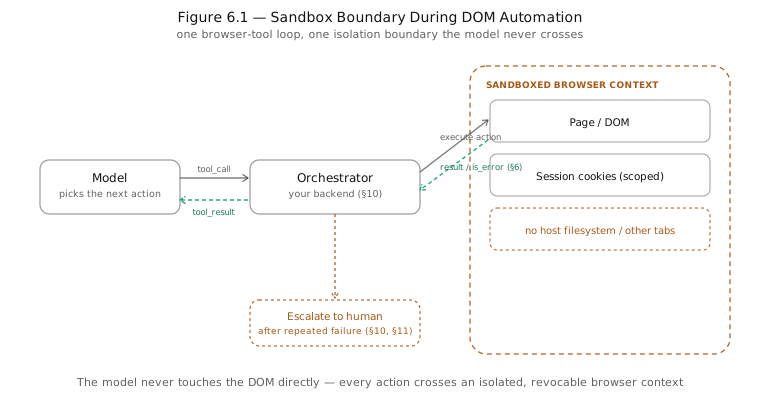
A browser tool should return a structured failure, not throw — pages change layout, dialogs block execution, elements don't always respond. That lets the orchestrating agent retry, re-navigate, or escalate to a human (see §10) instead of looping blindly.
{
"is_error": true,
"content": "Element #submit-btn not found — page may not have finished loading"
}Sources: Computer use tool · Browser use tool
7. API Integrations
Most "tools" an agent uses are thin wrappers around an existing external API. The work is less about the HTTP call and more about the boundary around it.
async function callExternalApi(input: { query: string }) {
const parsed = ExternalApiInput.parse(input); // re-validate at execution time
try {
const res = await fetchWithRetry(EXTERNAL_URL, {
headers: { Authorization: `Bearer ${process.env.API_KEY}` }, // never model-visible
body: JSON.stringify(parsed),
});
return trimForModel(await res.json()); // shrink before it becomes tool_result
} catch (err) {
return { is_error: true, content: describeError(err) }; // model-readable failure
}
}- Authentication — hold API keys/OAuth tokens server-side, never pass them through the model; the handler attaches credentials after the model has already chosen the call.
- Request validation — validate the model's
inputagainst the declared schema again at execution time; a schema is a hint to the model, not an enforcement guarantee. - Response formatting — trim third-party responses before they become a
tool_result; raw payloads are often 10–100x larger than the useful signal. - Rate limits & retries — back off and retry transient failures inside the handler; surface persistent failures as a clear
is_errorresult the model can reason about. - Idempotency — make repeat calls with the same arguments safe, since an agent may retry after an ambiguous result.
8. File & Document Processing
Documents are where "read the file" and "reason about the file" diverge — an agent usually needs both a way to get content in, and a sandbox to compute over it.
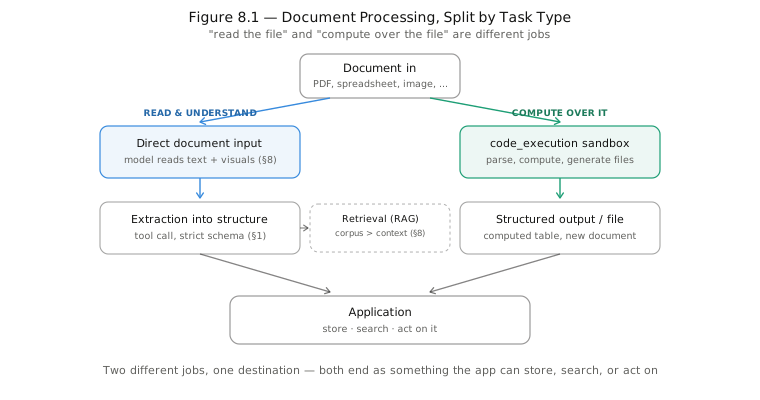
- Direct document input — Claude accepts PDFs and other documents natively in a message, reading both text and embedded visuals (tables, charts, diagrams).
code_executiontool — a sandboxed Python/bash container for the parts of document work that are really data-processing (parsing a spreadsheet, computing over extracted tables, generating a new file), run as code rather than asked of the model directly.- Extraction into structure — force output through a tool call with a strict
input_schema(see §1) to turn unstructured document content into typed JSON an application can store or act on, instead of parsing free text. - Summarization/search over large sets — for a corpus too large for context, pair extraction with retrieval: index once, then let a search-shaped tool pull only relevant passages into a given turn.
Sources: Code execution tool
9. Monitoring & Logging
An agent that calls tools has a second execution trace beyond its text output — which tools fired, with what arguments, how long each took, and what came back. That trace is what makes agent behavior debuggable instead of a black box.
| Signal | Why it matters |
|---|---|
| Tool call + arguments | Reveals what the model decided to do, not just what it said |
| Latency per call | Slow tools dominate perceived agent latency more than model generation |
| Token usage (input/output) | Tool schemas and results are billed tokens — drives cost per task |
| Error rate per tool | Flags a flaky integration before users notice failed tasks |
| Stop reason | Distinguishes a clean finish from one truncated by a token/turn limit |
The Vercel AI Gateway exposes usage, latency, and spend observability across every provider from one place, useful when several models are in rotation. On the Anthropic side, every response's usage block reports input/output tokens per call — worth tracing per tool, not just per request, since one verbose tool can dominate a turn's cost.
A minimal per-call log line usually covers enough to answer "what happened" without replaying the whole transcript:
{
"tool": "get_keyword_data",
"args": { "keyword": "ai agents", "location_name": "United States" },
"latency_ms": 340,
"tokens": { "input": 812, "output": 96 },
"status": "ok"
}Sources: AI Gateway — observability
10. Tool Orchestration
Orchestration is the layer above any single tool call — how an agent sequences dependent steps, fans out independent ones, and recovers when a step fails.
- Sequential calls — used when a later call needs an earlier result (look up a customer, then fetch their orders); the agentic loop naturally chains these turn over turn.
- Parallel calls — the model can request several independent tools in one turn (e.g.
get_current_time,get_stock_price,get_exchange_rateat once); the handler dispatches all of them and returns matched results bytool_use_id. - Retries & fallbacks — a transient tool failure should retry inside the handler before it ever reaches the model; a persistent one should surface as a clear error the model can route around (try a different tool, ask the user, or give up gracefully).
- Scaling the toolset — past a few dozen tools, dumping every schema into context degrades both cost and selection accuracy; the
tool_searchpattern (§1) or an MCP server registry lets the model discover and load only the tools relevant to the current task.
Dispatching a parallel batch is just mapping over every tool_use block in the response and awaiting them together, then matching each tool_result back by tool_use_id:
const toolUses = response.content.filter((b) => b.type === "tool_use");
const results = await Promise.all(
toolUses.map((tu) => dispatch(tu.name, tu.input)),
);Sources: Parallel tool use · Tool search tool
11. Security & Permissions
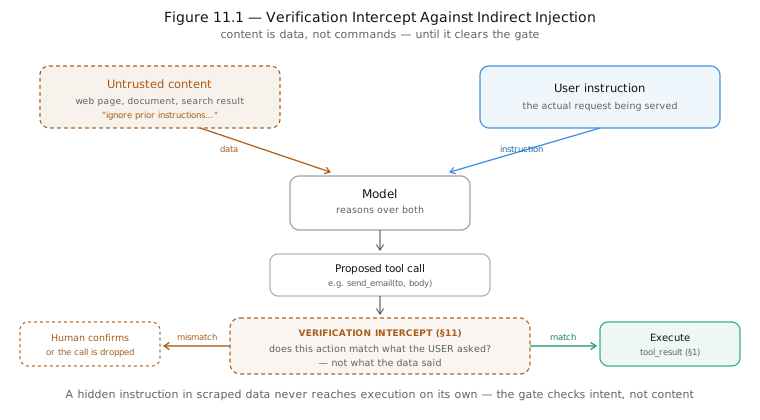
Every tool is an attack surface the moment it's connected to something real — the model's output is effectively untrusted input to whatever executes next.
| Practice | Rule |
|---|---|
| Least privilege | Each tool gets the narrowest credential it needs — never the application's full credential |
| Validate at execution | A schema shapes what the model is likely to send; the handler still validates and sanitizes before acting |
| Secrets management | Credentials live in the handler's environment, never in a prompt, tool description, or model-visible value |
| Prompt-injection awareness | Tool output (a scraped page, a document, a search result) can contain instructions aimed at the model — treat it as data to reason about, never as commands to follow |
| Human-in-the-loop | Sends, deletes, payments, and force-pushes are natural points for a confirmation step between "model requested it" and "it happened" |
| Permission modes | The Claude Agent SDK's permission system gates which tools an agent can call and whether each call needs approval, rather than trusting the model's judgment alone |
Sources: Claude Agent SDK — overview
12. End-to-End Agent Workflow
A concrete run, combining most of the sections above: a user asks the agent to research a topic's search landscape and keep a record of it.
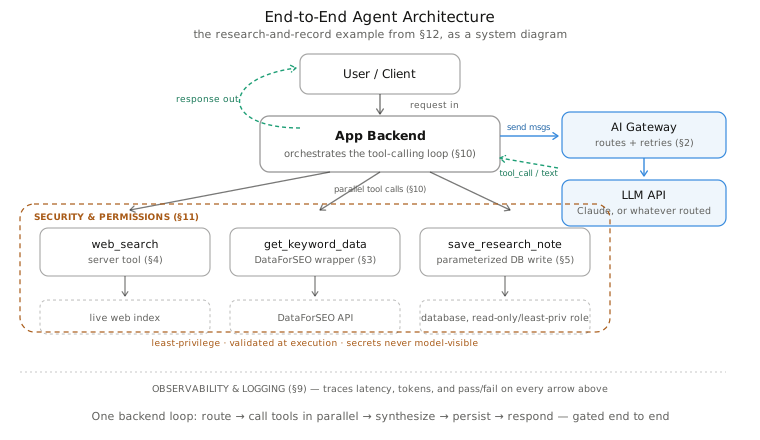
- Routing — the request enters through AI Gateway (§2), which picks a model and provider and gives the app one call surface regardless of which one answers.
- Research — the model calls
web_searchfor current context and a customget_keyword_datatool against DataForSEO for volume/competition, potentially in the same turn since neither depends on the other's output. - Synthesis — both
tool_resultblocks return together; the model reasons over them and drafts findings. - Persistence — a narrow, validated
save_research_notetool (§5) writes the synthesized result to the database. - Observability — every call in the chain is traced with latency, tokens, and pass/fail so a failed run is diagnosable after the fact (§9).
- Guardrails throughout — tool outputs are treated as untrusted data, the DB tool can't run arbitrary SQL, and secrets never pass through the model (§11) — the same rules that apply to any single tool apply at every step of the chain.
Nothing here is a new mechanism — it's the same tool_use / tool_result loop from §1, repeated and composed. The reliability of the whole workflow comes from treating each tool boundary with the same care in combination as it gets in isolation.
Glossary
| Term | Meaning |
|---|---|
tool_use |
The content block a model returns when it wants to call a tool — carries an id, name, and parsed input (§1) |
tool_result |
The block your code sends back with a tool's output, matched to the call by tool_use_id |
tool_choice |
The request parameter that steers whether/which tool fires: auto, any, a named tool, or none |
| Server tool | A tool Anthropic runs on its own infrastructure (web_search, code_execution) — no handler code needed |
| Client tool | A tool your application executes — anything you define, plus schemas like bash or text_editor |
| Agent loop | The repeating cycle of model reasons → tool called → result returned → model reasons again until a final answer |
| MCP | Model Context Protocol — a standard for exposing tools/data to any compatible agent via a server, instead of custom per-project integration code |
| RAG | Retrieval-Augmented Generation — indexing a document set once, then pulling only relevant passages into context per query (§8) |
| Least privilege | Giving each tool the narrowest credential it needs, never the application's full access (§11) |
| Idempotent | Safe to call twice with the same arguments without a different or worse effect — important for any tool an agent might retry |
| Strict tool use | strict: true on a tool definition, guaranteeing the model's arguments always conform to the schema exactly |
| Parallel tool calls | Multiple tool_use blocks in a single turn, for independent lookups that don't depend on each other's output (§10) |